
Every Renewal in One View: The New Renewal Timeline Report in LCM
The renewal that costs you money is rarely the one you forgot about. It is the one nobody was tracking in the first place.
A reminder fires for a contract someone remembered to configure. It does not fire for the agreement that was signed by a different team, filed in a different inbox, and never entered with a date. That contract does not generate an alert. It generates an auto-renewal.
The new renewal timeline report in License and Contracts Manager exists to close that gap. Instead of waiting for individual reminders to arrive, it puts every upcoming renewal on a single twelve-month view, ordered by time and weighted by value, so you can see the shape of the year before it starts making decisions for you.
The problem with reminders on their own
Renewal reminders are useful. They are also, on their own, a reporting layer rather than an answer.
A reminder tells you that one contract is approaching its date. It does not tell you how that contract sits relative to the eleven others renewing in the same quarter. It does not tell you whether it is the largest exposure in that window or the smallest. It does not tell you which agreements in your estate have no reminder configured at all, which is precisely the population you most need to know about.
The result is a familiar pattern. Renewals get handled one at a time, in the order the alerts happen to arrive, rather than in the order of commercial consequence. Negotiation preparation starts when the notification lands rather than when leverage is highest. And the contracts nobody entered properly stay invisible until finance notices the charge.
That is the same failure mode we described in five signs your SAM reporting is slowing executive decisions, applied specifically to contracts. Output arrives. Context does not.
What the timeline actually shows
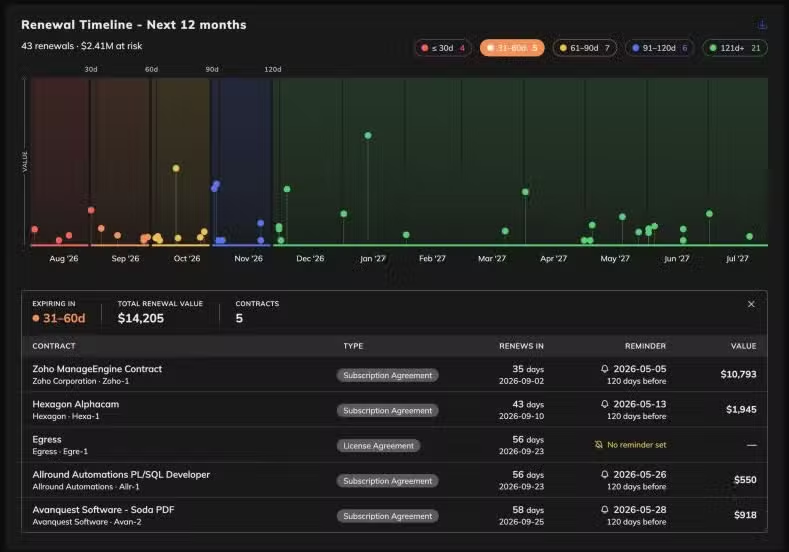
The report opens on a twelve-month horizon with every contract renewal plotted against its date. Each renewal is a point on the timeline, and the vertical axis is value, so size and timing are visible in the same glance.
That combination is the point. A renewal calendar tells you when things happen. A renewal timeline tells you when things happen and how much is riding on each one, which is a different question and the one that actually drives sequencing.
Above the chart, the view summarises the whole horizon: how many renewals are in scope, and what total value sits across them. In the example below, that reads as 43 renewals with $2.41M at risk over the next twelve months.
Renewals are then bucketed by urgency:
| Window | What it means in practice |
|---|---|
| 30 days or less | Too late to negotiate. Prepare to execute or accept terms |
| 31 to 60 days | Leverage window closing. Position needs to be built now |
| 61 to 90 days | Optimal preparation window for most agreements |
| 91 to 120 days | Time to validate usage against entitlement |
| 121 days or more | Strategic horizon. Consolidation and rationalization decisions live here |
Those bands are not arbitrary. They map to how much room you still have to change the outcome. A contract at 95 days is a negotiation. The same contract at 25 days is an administrative task.
Drilling into a window
Selecting a band filters the detail table underneath to just those contracts, with the total renewal value and contract count for that window.
The table carries what you need to act rather than what the database happens to store:
- The contract and the vendor behind it
- Agreement type, so a subscription and a perpetual licence are not treated identically
- Days remaining alongside the actual renewal date
- Whether a reminder is configured, and how far in advance
- Contract value
Five columns, all of them decision inputs. Nothing there is decorative.
The most useful thing in the report is a blank cell
Look at a populated timeline for long enough and one row type stands out: the contract with no reminder set.
That row is the report doing something a reminder system structurally cannot. A reminder can only warn you about contracts somebody remembered to configure. The timeline shows you the ones nobody did, sitting in the same list as everything else, with a visible gap where the notification should be.
Sometimes that row also has no value recorded, which means it will not appear in any spend analysis either. It is a live commitment that is invisible to both your alerting and your reporting.
Those are the renewals that auto-renew quietly. Finding them is worth more than any individual reminder, and the only way to find them is to look at the whole population at once rather than waiting for the population to announce itself one item at a time.
How it works with what LCM already does
The timeline does not replace renewal reminders. It sits alongside them.
Reminders remain the operational trigger. They are what pulls a specific contract into someone’s queue on a specific day, and configurable lead times mean that trigger arrives when there is still room to act.
The timeline is the planning layer above that. It answers a different set of questions: what does the next quarter look like, where is the concentration of value, which windows are crowded, and what have we not accounted for.
Alerts tell you what is happening now. The timeline tells you what is coming and in what order it matters. Most teams have had the first for years and have been building the second manually in a spreadsheet every quarter.
Where this sits in a renewal position
A timeline is a starting point, not a finished position. Knowing that $2.41M renews in the next year tells you where to look. It does not tell you what to renew, what to reduce, or what to drop.
That comes from linking the contracts to what is actually deployed and used. LCM holds the agreements, dates and entitlements. Software Inventory Manager establishes what is genuinely installed across the estate. NEO reads the agreement itself for risk, benchmarks and negotiation angles.
Together that is the difference between arriving at a renewal knowing the date and arriving knowing your position. More on how that fits together on the renewal optimization page.
It is also worth remembering what usually sits underneath these numbers. When we looked at what we keep finding in enterprise software estates, 87% of software categories containing a paid tool also had a free tool doing the same job. A renewal timeline that surfaces a contract 120 days out gives you time to ask whether you need that contract at all.
What is coming next
The current constraint on any contract management system is data entry. Somebody has to read the agreement and put the terms into fields, and until that happens the contract is not in the timeline at all.
We are working on OCR that reads uploaded contracts and updates entitlement records automatically. Upload the PDF, and the vendor, dates, terms and quantities populate without anyone retyping them.
That matters more than it sounds. Every “no reminder set” row and every missing value in a renewal timeline traces back to the same cause: manual entry that never happened. Removing the manual step removes the gap.
Progress on this and other releases is tracked on the releases page.
Try it on your own contracts
The renewal timeline report is available now in License and Contracts Manager.
If your contracts already live in LCM, the view is there. If they do not, connect your data sources or upload what you have and the timeline builds from it.
Book a demo to see the renewal timeline running on real data, or get in touch to talk through how your renewal calendar is currently being managed.
Figures shown in the interface are illustrative.


