What's new in LICENSEWARE
New integrations, smarter reports, faster insights. Here's everything we've shipped recently, written in plain English. No jargon, just what changed and what it means for you.
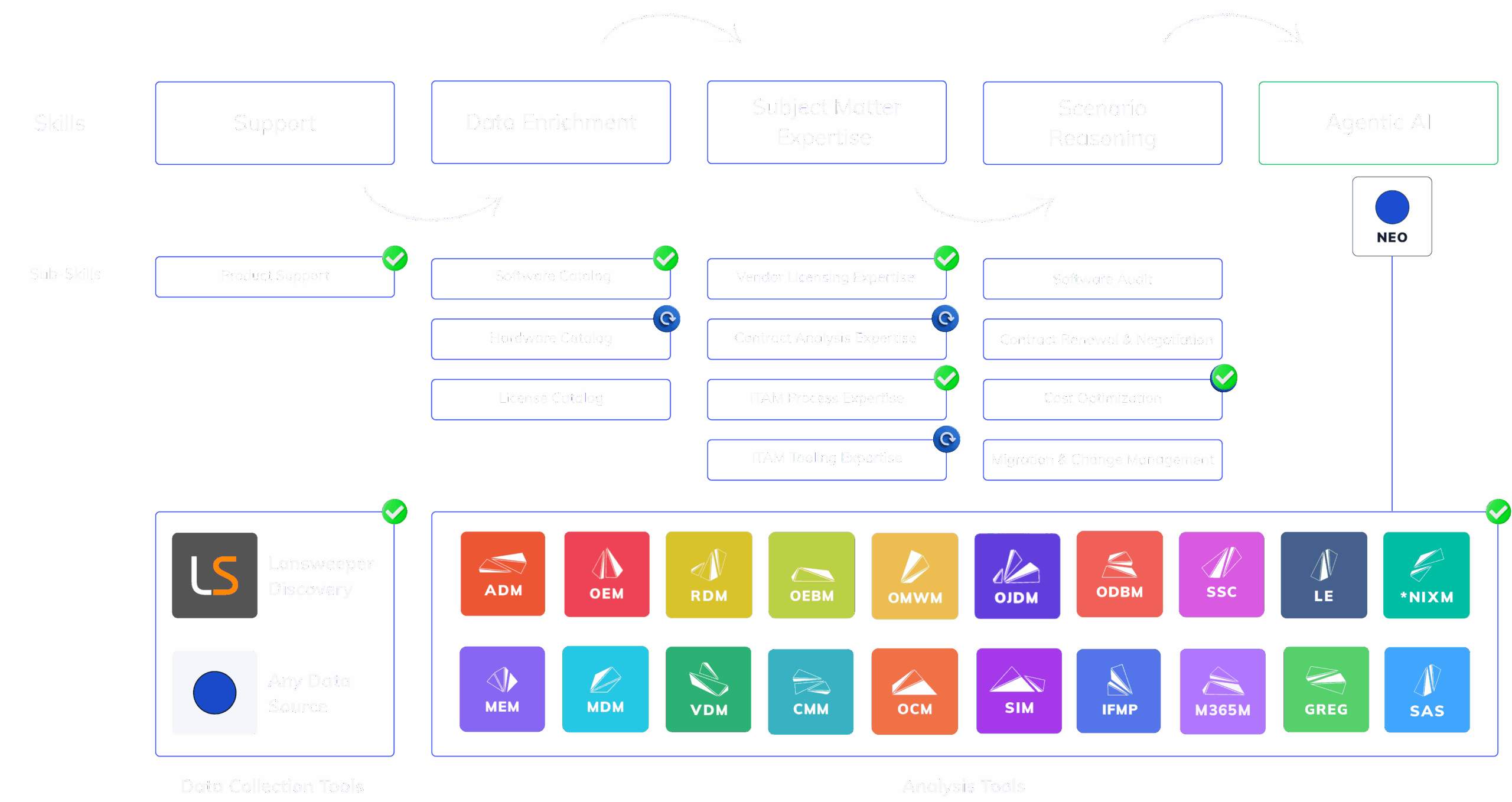
SIM Now Manages SaaS and AI Spend, Per User.
Software Inventory Manager (SIM) expands into SaaS and AI cost management: SSO connectors for Microsoft Entra ID, Google Workspace and Okta, dedicated API connections to Anthropic Console and Enterprise, OpenAI, ChatGPT Enterprise, Cursor, Google Gemini, Microsoft 365 Copilot and GitHub Copilot, detailed token analysis and usage per user, and SaaS spend analysis. Included in the Core plan, with no separate price.
-
SSO connectorsMicrosoft Entra ID, Google Workspace and Okta show which SaaS apps your people have access to.
-
AI platform APIsAnthropic Console and Enterprise, OpenAI, ChatGPT Enterprise, Cursor, Google Gemini, Microsoft 365 Copilot and GitHub Copilot, each by a dedicated API connection.
-
Usage per userDetailed token analysis and usage per user, so AI spend has a name next to it.
-
SaaS spend analysisA cost beside every SaaS app, in the same inventory as your installed software.
- Feature SSO connectors for SaaS discovery. Microsoft Entra ID, Google Workspace and Okta show which SaaS apps your people have access to.
- Feature Dedicated AI platform APIs. Anthropic Console and Enterprise, OpenAI, ChatGPT Enterprise, Cursor, Google Gemini, Microsoft 365 Copilot and GitHub Copilot connect directly to SIM.
- Feature Token analysis and usage per user. Detailed token analysis and usage per user across the AI platforms SIM connects to.
- Feature SaaS spend analysis. What each SaaS app costs, beside the people who have access to it.
ADM Reads the Adobe Admin Console.
Adobe Deployment Manager (ADM) now connects to the Adobe Admin Console by API, pulling additional information that it matches to the installation and usage data LICENSEWARE collects locally.
Editor and Viewer Roles.
Role-based access control (RBAC) arrives on the platform with two roles, editor and viewer, so you decide who works on the data and who reads the results.
SIM, ADM and OJDM Now Read Every Data Source.
Software Inventory Manager (SIM), Adobe Deployment Manager (ADM) and Oracle Java Deployment Manager (OJDM) now read the installed software from every connected data source, not only some of them, so the new API integrations feed all three apps.
All three apps. SIM, ADM and OJDM read installed software from every data source you connect, not only from some of them.
New integrations included. Jira Service Management Assets, Freshservice, Ivanti Neurons for ITAM, TOPdesk and Wiz feed all three apps like any other data source.
Five New Integrations: Jira Service Management Assets, Freshservice, Ivanti Neurons, TOPdesk and Wiz.
LICENSEWARE now connects by API to Jira Service Management Assets, Freshservice, Ivanti Neurons for ITAM, TOPdesk and Wiz, so the assets and software in your service desk and cloud tools can be imported without an export.
Jira Service Management Assets. Imports assets and the software installed on them through the Jira Service Management Assets API.
Freshservice. Imports assets and the software installed on them through the Freshservice API.
Ivanti Neurons for ITAM. Imports assets and the software installed on them through the Ivanti Neurons for ITAM API.
TOPdesk. Imports assets and the software installed on them through the TOPdesk API.
Wiz. Imports cloud workloads and the software running on them through the Wiz API.
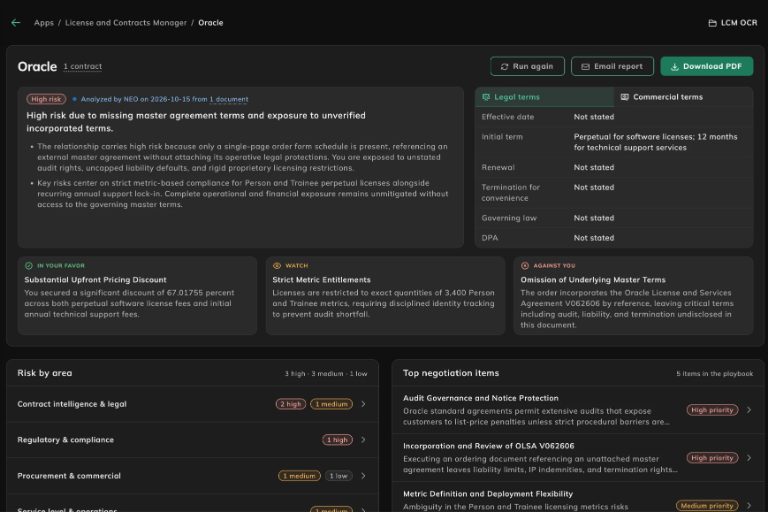
Contract Compliance Analysis, Now Inside LCM.
NEO's contract analysis now lives in License and Contracts Manager (LCM) as an interactive view instead of a PDF sent by email: an overall risk rating, legal and commercial terms, findings by area, benchmarks, financial exposure and a negotiation playbook. You can still email the report or download a PDF from the same view.
-
Risk at a glanceAn overall risk rating, the legal and commercial terms, and the headline points for and against you.
-
Findings with their sourceEvery finding links to the clause it comes from, the exposure it drives and the playbook item that answers it.
-
Benchmarks and exposureYour terms set against best in market, market standard and vendor favorable, with the scenarios that would turn them into a cost.
-
A negotiation playbookItems ranked by priority, each with an ideal, an acceptable and a minimum position to negotiate from.
- Feature An interactive view in LCM. NEO's contract analysis opens per vendor in License and Contracts Manager (LCM), next to the contracts it describes.
- Feature Findings, benchmarks and exposure. Findings by area and severity, each term benchmarked against the market, and the financial exposure behind a weak clause.
- Feature A negotiation playbook. Priority items with ideal, acceptable and minimum positions, each showing the findings behind it.
- Improvement Email and PDF still there. Send the report by email or download it as a PDF from the same view.
License and Contract Status, Set Automatically.
LCM can now set a license's or contract's status automatically, and shows whether a status is automatic or set by hand in tables, the detail view and the edit form. Template settings also render long names and the count placeholder correctly.
Collector 0.17.0: Safer Certificates and Controlled Rollouts.
The LICENSEWARE Collector 0.17.0 is built with Go 1.26.10, which rejects certificates from compromised certificate authorities (CVE-2026-111943). It also brings a rollout kit for large fleets: a prerelease canary, withhold and restore per operating system, and an Intune remediation script.
A Free Encyclopedia of Software Licensing.
The LICENSEWARE Wiki is open in beta: 1,816 articles on 1,149 vendors, with 3,819 license metrics and 16,671 counting rules, each traced to the vendor's own documentation. It is free to read, for everyone, at wiki.licenseware.io. Read the announcement.
See Where a License's Dates Come From.
Standalone license renewals now appear in the renewals report, and licenses show where their dates come from: a new date source column, a label when a license takes its dates from its contract, and the license's data source in the detail header.
Proactivanet Now Feeds ADM and OJDM.
Proactivanet data now also flows into Adobe Deployment Manager (ADM) and Oracle Java Deployment Manager (OJDM), on top of SIM and IFMP.
Clearer Names and Logos on the Data Sources Page.
Lansweeper Cloud now leads the API sources, RVTools shows the Dell logo, and the SCCM source is now called Microsoft System Center.
Collector Devices Keep Their Source.
Devices reported by the LICENSEWARE Collector now carry the Collector as their data source, including the CPU details it gathers, so Assets shows where each device came from.
Tidier App Pages and Sign-in Links.
App detail pages drop the History tab and put their tabs in a clearer order. The sign-in page's footer now links to the current legal pages and help center.
Five New Integrations, and Every Data Source in One Place.
LICENSEWARE now connects to CrowdStrike Falcon, Microsoft Defender for Endpoint, SentinelOne, Jamf Pro and Fleet, so the security and device tools you already run feed your estate directly. A new Data Sources page shows every connection in one place, from API integrations to file uploads, with each one's runs and history.
-
Security toolsCrowdStrike Falcon, Microsoft Defender for Endpoint and SentinelOne add the devices they already protect.
-
Device managementJamf Pro brings in your Macs, and Fleet the machines it manages.
-
Data Sources pageEvery connection on one screen, grouped by how its data arrives.
-
Full historyEarlier uploads now show as runs, so nothing you sent before goes missing.
- Feature Five new API integrations. CrowdStrike Falcon, Microsoft Defender for Endpoint, SentinelOne, Jamf Pro and Fleet connect directly, with no export to schedule.
- Feature A Data Sources page. Every connection in one list, API or upload, each with the runs it has made.
- Improvement ServiceNow and Oracle, simplified. ServiceNow exports arrive as one data source, and the twelve Oracle upload types are now three sources.
- Improvement Your upload history, kept. Earlier file uploads appear as runs on their data source, and a run that reset a source says so.
- Improvement Names, not codes. Reports and Assets tables show each data source by name instead of an internal ID.
Export Any Table, However Big.
Every table now exports in the background, across reports, Assets and License and Contracts Manager (LCM), so a large download no longer holds up the page. An export you have already run comes back straight away, and an Excel export over 500,000 rows switches to CSV instead of failing.
Upload a Whole Contract Folder at Once.
License and Contracts Manager (LCM) no longer limits how many files or documents go into a single upload. Drop in every contract and purchasing document you have, and NEO reads all of them.
Last Used Dates for Software Nobody Opens by Hand.
When no user launch has been recorded on Windows, the last used date now falls back to the last time the program was seen running. Fewer titles sit with no date at all, and a real launch still takes priority whenever one is observed.
Every Device, User and Install Counted Once.
Software Inventory Manager (SIM) now counts each device, user and install once, even when several data sources report it. Excluded installs stay out of software exports, Microsoft Deployment Manager (MDM) no longer counts SQL Server client tools as SQL Server, and Windows Server machines that Intune reports as plain Windows are recognised from Entra ID. If one Microsoft Graph permission is refused, the rest of your Microsoft 365 data still syncs.
Your First Analysis Arrives Sooner.
The first analysis after you connect your data now runs its steps in parallel and keeps your device topology at hand between runs, so results land sooner. Assets views rebuild only what has changed instead of starting from scratch.
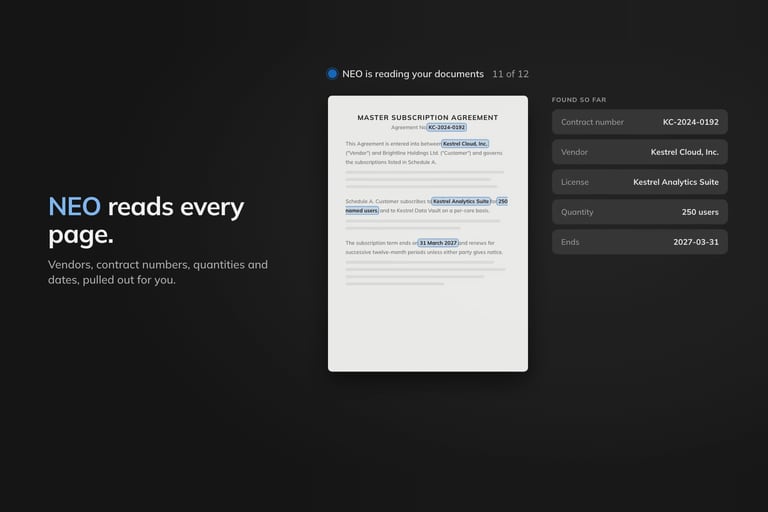
Turn Any Software Contract Into License Data in Minutes.
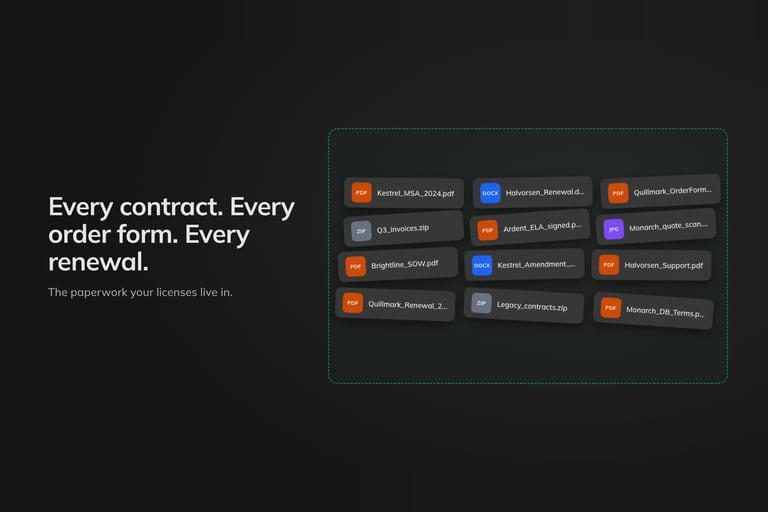
NEO now brings AI-powered OCR extraction to License and Contracts Manager (LCM). Drop in your software contracts and purchasing documents in any format, and NEO pulls out the relevant data, centralizes it and flags the risk. No manual entry, no spreadsheet archaeology, just contract data you can actually use.
-
Any formatPDFs, screenshots, Word files and scans all go in the same way, with nothing to convert first.
-
AI-powered OCRNEO reads every page, scans and screenshots included, and pulls out the data that matters.
-
Centralized in LCMWhat NEO extracts lands in one place in LCM, not in another spreadsheet.
-
Risk flaggedExtraction and risk analysis run in one workflow, so issues surface as the data comes in.
- Feature A Documents tab in LCM. Drop in contracts and purchasing documents in whatever format you have them.
- Feature OCR extraction powered by NEO. Scans and screenshots are read as well as PDFs and Word files, and the relevant data is pulled out for you.
- Feature Risk analysis in the same workflow. NEO flags the risk while it extracts, so there is no second pass to find it.
- Improvement No manual entry. Contract data you can use the day the document arrives, without retyping it first.
From a Usage Row Straight to the Product.
Rows in the software usage tables in Assets now link to the product's own page, so you go from who is using a title to everything else you know about it in one click. Collector agents that have registered but not reported yet are labelled Awaiting first check-in, instead of looking like agents that went quiet.
Last Used Now Means Someone Actually Opened It.
On Windows, a program's last used date now comes only from launches a user made themselves. Background signals such as prefetch, background activity records, running processes and services, and fuzzy matches on a program's name or path, no longer set it. Expect fewer and later last-used dates for a while: a title gets one once a real launch has been observed, and the date you do see is one you can take into a reclaim conversation.
Your MDM Can Now Check the Collector Is Registered.
The LICENSEWARE Collector now reports its registration state in forms a machine can check: a file, a registry value and status exit codes. MDM tools can use any of them as a detection rule, so a deployment tells you whether the agent is registered, not only whether it is installed.
Cleaner Lansweeper Imports.
Lansweeper imports now bring in only active assets, so inactive ones stay out of your estate. Scanned records are preferred over other records, and ESXi CPU counts now come through correctly.
Every Device and Install, Now in One Assets Tab.
The new Assets tab puts your estate in one place: devices, the software installed on them, and what sits underneath, laid out as tables you expand rather than screens you jump between. Select what you need and apply the change without leaving the table.
-
Tree tablesExpand from a device down to what is installed on it, so you follow one thread instead of switching screens.
-
Apply modalsMake one change to everything you have selected, in place, without leaving the table.
-
Observed usersDrill from an installation down to the people actually seen on it, not just the seat it was assigned to.
-
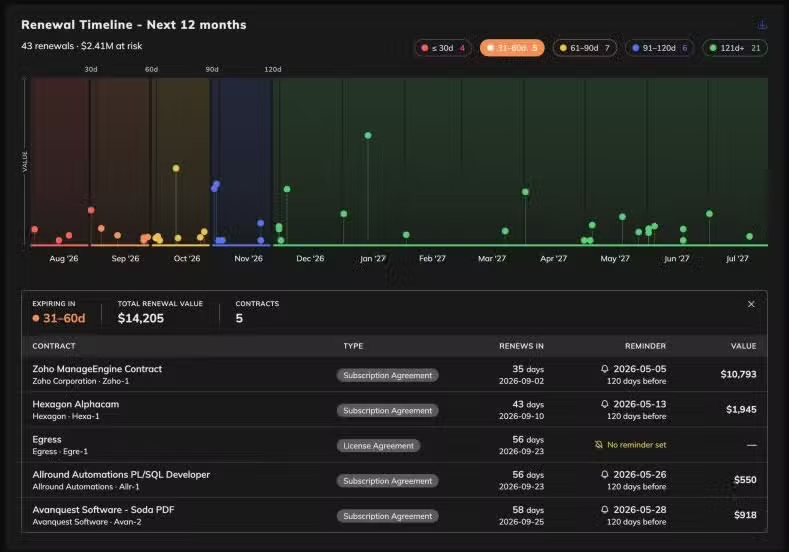
Renewal timelinesContract and license bars give way to timelines, so expiries read in date order.
- Feature Tree tables across the estate. Expand a device to the software installed on it and keep following the thread, instead of switching screens.
- Feature Apply modals for bulk changes. Select the rows you need and make the change in place.
- Feature Observed users on software installations. See who has actually been on a machine, not only who the seat was assigned to.
- Improvement Renewal timelines replace the contract and license bars. Expiries now read in date order.
- Improvement Assets tables download again. The exported file comes out formatted correctly.
Know When Software Was Last Opened.
Every software table now carries a last used date. It is the one column that turns a reclaim conversation from an argument into a decision: you can see what nobody has touched in months before you go asking for the budget to renew it. It pairs with the observed users on installation drill-downs, so you see both who has a title and whether anyone actually opens it.
Collector Now Knows Which Machine Is Which.
Agent identity got a lot firmer. The agent sends the machine's hardware serial when it registers, so two machines that look alike are still told apart, and an administrator-assigned device identifier now wins over anything the agent works out for itself. The platform stores that serial and reports an identity conflict rather than quietly folding two machines into one, and a cap on how many identities a single host can register stops one misbehaving machine flooding your agent list.
Pause an Agent. Uninstall It Cleanly.
The agent action that used to be called Disable is now called Pause, which is what it actually does. Taking an agent off a machine got safer too: uninstall is OS-aware and cleans up properly on each platform, Windows removal runs from the installed package itself, and Linux upgrades start from a baseline that works. Third-party license notices now ship with the agent.
Cleaner Device Counts Across Virtual Estates.
A run of corrections that stop devices being counted as the wrong kind of thing. ESXi hosts are typed as physical machines and the virtual machines on them as virtual, so host and guest counts stop blurring together. Devices that exist only in your cloud directory are no longer staged as physical hardware, devices whose parent and child links form a loop stay in the topology instead of being dropped, and retired devices nobody replaced are withdrawn from the assets built on top of them, so decommissioned kit stops counting.
A Software Catalog That Refreshes Itself.
The software catalog now re-syncs from its source every twelve hours, and each analysis run compiles it fresh instead of reusing a cached copy. A newly recognised title turns up in your results without waiting for a release.
Licenses Now Stand on Their Own, Without a Contract.
Licenses are first-class records now. You can create and manage one without attaching it to a contract first, which matches how most teams actually buy: the entitlement exists, the paperwork catches up later. Contract and license dialogs also load the full record when you open them, so you edit what is actually stored, and financial reports keep each amount in its original currency instead of flattening everything to one.
A Fresh Coat of Paint, Starting With Insights.
We rolled out a set of new styling rules across LICENSEWARE and applied them first to the NEO Insights reports, which now match the visual language of the rest of the app. Cleaner spacing, more consistent components, better hierarchy. Same content, easier on the eyes. More surfaces will follow in the coming weeks.
Collector: One-Click Install, Better Agent Controls.
Collector picked up a wave of deployment and management improvements. A new one-click bundle installer enrols a new agent in about a minute. No scripts, no config files. Once agents are running, the timeline now surfaces restart and update acknowledgements, unreachable agents get a proper offline status so they don't skew your view, and you can remove agents with a single command when devices are decommissioned.
Sharper Data, Cleaner Screens.
A handful of quality improvements landed across the platform. Collector no longer pushes OS-bundled system software to SIM, so your app catalog stops filling up with Windows components and other things that aren't really "installed software." The RVTools uploader now handles exports with sheet-prefixed column names, which is what newer RVTools versions default to. And the reports tab in assessments shows processing state clearly, so you can tell what's actually running.
Track Licenses by Business Unit, Cost Center, and Department.
LCM's licenses table now includes business unit, cost center, and department as first-class fields. Every license can be tagged to the org structure that actually pays for it, so cost allocation, chargebacks, and internal reporting stop being a spreadsheet exercise. Sort and filter on any of them.
Notifications, Rebuilt From Scratch.
The notifications system got a full UI rebuild. Cleaner presentation, easier to scan when things stack up, and better organization overall. What you need to know surfaces faster, what you don't stays out of the way.
See Every Renewal on One Timeline.
License and Contracts Manager now includes a renewal timeline report component. Every upcoming license expiry laid out on a single visual timeline, so you can spot the clusters where multiple renewals hit the same quarter before they become a fire drill.

Collector, Now Generally Available. With Agent Management Built In.
Two years of hardening, thousands of installs, and enough field time to trust it with your production estate. LICENSEWARE Collector is officially out of beta. Alongside the GA milestone, we're shipping a new agent control plane so you can manage every deployed agent from one screen: see what's running where, when it last checked in, and roll out updates with proper version gating so nothing hits an agent that can't handle it.
-
Out of betaProduction-grade and fully supported. Existing beta installs are automatically GA.
-
Agent control planeManage every deployed agent from one screen. Send commands, roll out updates, retire installs.
-
Activity timelineGrouped view of what agents have been doing, so patterns and issues surface fast.
-
Version-gated commandsUpdates only run on agents that support them. No more accidentally breaking an older install.
- Feature Agent control plane for managing installs at scale from a single screen.
- Feature Grouped activity timeline that makes agent behaviour easy to read at a glance.
- Improvement Version-aware command dispatch so updates never hit incompatible agents.
- Note Existing beta customers are automatically GA. No action needed.

Microsoft Graph, Now on Cleaner OAuth.
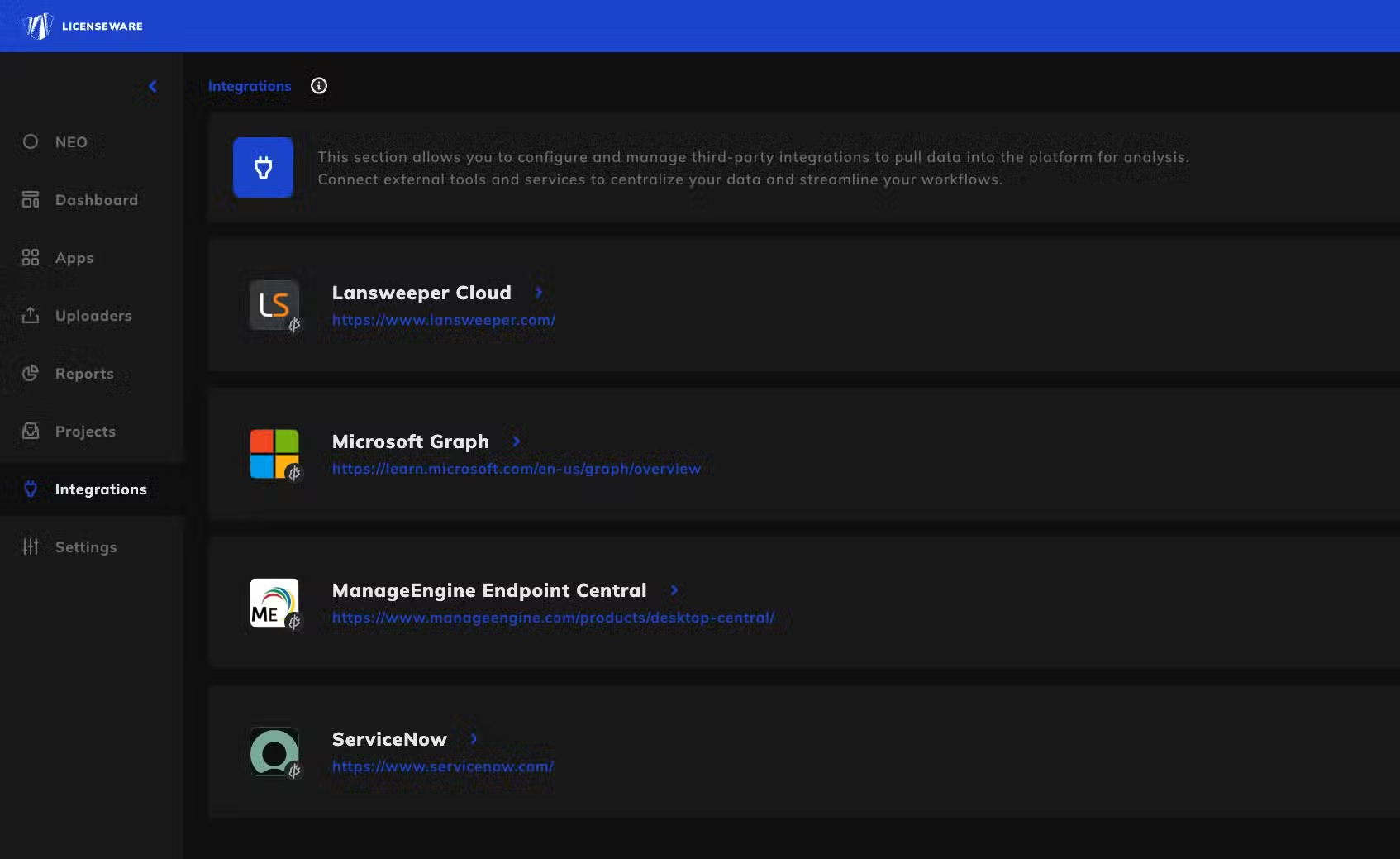
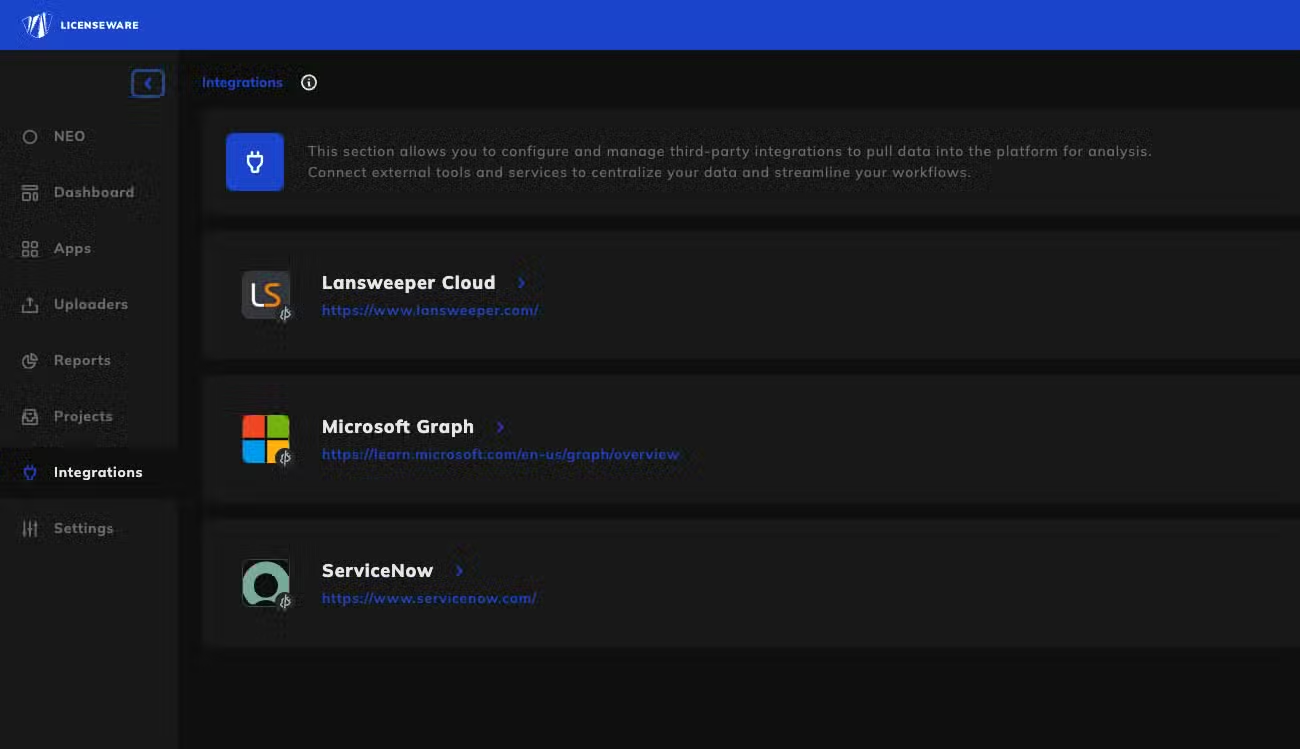
The Microsoft Graph connector migrated to client credentials OAuth. Cleaner authentication, easier to manage across tenants, and better aligned with Microsoft's current recommendations. If you're already connected, reconnect once from the Integrations tab to switch over.
Cleaner Integrations, Reports, and Uploads.
The screens where you connect data sources, browse reports, and upload files got a full visual refresh. Consistent layouts, cleaner cards, better spacing. Same content, easier to scan. Account settings also got wired to a proper form now, so profile changes save cleanly on the first try.
Filtered Exports for Every Report Component.
You can now apply filters directly at export time and only pull the rows you actually want. Filter by vendor, date range, project, whatever the report supports — the exported file matches your filtered view exactly. No more slicing spreadsheets after the fact.
Sharper SIM: Bulk Edits, SCCM Uploads, EOL Dates.
A round of Software Inventory Manager improvements. You can now upload SCCM query results directly, with a dedicated uploader that handles the format natively. The bulk-edit template got simpler too: relevance is auto-derived where possible, EOL dates are baked in, and enum overrides now handle case variations cleanly with clear warnings when values get dropped.
Smarter LCM: Renewal Reminders and Broader Allocations.
Two upgrades to License and Contracts Manager landed in the same window. Automated renewal reminders now fire before each license expires, with configurable lead time per license so the right people get pinged at the right moment. And allocations now cover user-recognised products, not just catalog-mapped ones — so custom apps and internally-defined products get the same rigour as the big vendors.
NinjaOne Inventory, Streaming Straight Into LICENSEWARE.
If NinjaOne is how you run your endpoints, you already have the data LICENSEWARE needs. The new NinjaOne connector pulls device inventory, installed software, and asset status from your NinjaOne tenant straight into LICENSEWARE. No CSVs, no manual exports, no waiting on someone else to refresh the dump. Connect once, and your license analysis runs on data that's always current.
-
Device inventoryEvery managed endpoint, its OS, owner, and status pulled from NinjaOne in real time.
-
Installed softwareWhat's running on every machine, what version, where. Across your entire fleet.
-
Read-only accessThe connector only reads from NinjaOne. Nothing is changed or written back. Ever.
-
Always up to dateData refreshes in the background. Your license position reflects what's actually deployed, not last month's snapshot.
- Feature License demand from reality. Every install NinjaOne sees becomes part of your license analysis automatically.
- Feature Decommissioned devices stop counting. When a machine goes offline in NinjaOne, it stops inflating your license demand here too.
- Improvement Works with SIM out of the box. Software Inventory Manager picks up the data immediately, no extra mapping required.
- Note Joins the connector lineup. NinjaOne sits alongside Lansweeper, Microsoft Graph, ManageEngine, and Proactivanet as a first-class data source.
Sharper Usage Data, Cleaner Device Charts.
Two improvements landed together. Collector now derives software last-used dates from running processes, so "is this app actually being used" is finally a precise question with a precise answer. And IFMP got a redesigned devices by OS and type visualization, rebuilt as a stacked bar chart that's much easier to read than the previous breakdown.
Proactivanet, Now a First-Class Data Source.
For teams running Proactivanet for IT asset management, getting that inventory into a SAM tool used to mean exports, transformations, and a lot of tab-switching. Not anymore. The Proactivanet connector pulls your CMDB inventory directly into LICENSEWARE, ready for license analysis the moment it arrives. Built and tested with European customers running mixed estates, certified ready for production use.
-
Your CMDB, ingestedEvery asset, configuration item, and software relationship from Proactivanet flows in automatically.
-
Always currentNo batched exports. The connector pulls fresh data so your license position reflects today, not last quarter.
-
Read-only accessNothing writes back to Proactivanet. We only read what we need for licensing.
-
Plays nice with everythingCombines with Lansweeper, Microsoft Graph, ManageEngine, and NinjaOne data without overlap.
- Feature One source of truth for ITAM stacks already running on Proactivanet. No duplicate inventory, no reconciliation work.
- Feature Combined view across data sources. Proactivanet sits alongside your existing connectors, so the analysis sees everything.
- Improvement First-class in the Integrations tab with proper iconography and a guided connection flow.
- Note Setup takes about five minutes. Hit Connect, paste your Proactivanet credentials, you're done.
Sign Up Faster, Skip the Form Wall.
Registration is shorter. We moved profile completion to first login, so the front door is now just email and password. We also added a proper onboarding flow that walks new users through the first useful screen. And if you're already logged in, hitting the login or signup URLs now bounces you straight to the app instead of making you stare at another form.
Refreshed Catalogs Across MDM and ODBM.
The product and edition catalogs underpinning Microsoft device licensing (MDM) and Oracle Database licensing (ODBM) got their scheduled refresh, and the Microsoft entitlement data in License and Contracts Manager (LCM) was refreshed with them. New SKUs, retired editions, and updated metric definitions are now reflected in your analyses. ODBM also now excludes unused database options from processor total cost, so you're not paying phantom licenses for features you never enabled.
Reserve Licenses Where You Need Them. See Renewals Like a CFO.
Two big upgrades to License and Contracts Manager landed together. You can now create custom reservations to ringfence licenses for specific projects, business units, or future hires, with a dedicated allocations view that shows exactly where every entitlement is committed. The financials and renewals reports got a full redesign too, built around the questions you actually ask before a renewal: what's it costing, what's expiring, what should we cut.
-
Custom license reservationsSet aside entitlements for a project, team, or planned headcount. Track exactly what's reserved, what's deployed, what's free.
-
Allocations viewA single screen showing every license, its assignment, and its reservation status across all projects.
-
Redesigned financial reportsCost by vendor, cost by project, cost trend over time. Built for renewal conversations with finance.
-
Smarter renewals viewWhat's expiring, when, what it costs, and whether you're using what you're paying for. All in one screen.
- Feature Custom reservations let you allocate licenses to specific projects, departments, or future deployments without losing visibility.
- Feature Allocations screen on every license, showing reservation, assignment, and free pool side by side.
- Improvement Financial reports redesigned around vendor cost, project cost, and trend over time. Built for the conversations you actually have.
- Improvement Renewals view consolidates expiry dates, contract value, and actual usage so you walk into renewals with leverage.
Get Help Without Leaving the App.
The "contact support" link no longer kicks you out to your email client. Hit support from inside LICENSEWARE and we open a HubSpot ticket for you, with your account context attached automatically. Faster routing for us, less context-switching for you.
Custom Fields Now Show Up in Reports.
When we shipped custom fields per project earlier this month, they captured your data but didn't surface in reports. Now they do. Every field you define on a project flows through to compliance, license, and contract reports, properly flattened in tables so you can sort, filter, and export them alongside everything else.
Themes That Follow Your OS, Auth Pages That Feel Like the Product.
LICENSEWARE now respects your operating system theme by default. If your OS is in dark mode, so is LICENSEWARE. Switch to light during the day, and the app follows. You can still pin a manual preference if you prefer. We also redesigned the login, signup, and password-reset pages so the entry into LICENSEWARE finally looks like the rest of LICENSEWARE.
Collector: More Reliable in Corporate Networks.
A round of Collector reliability improvements. The Windows agent now preserves proxy environment variables across service restarts, so corporate-proxy setups stop dropping mid-scan. Ingestions are faster too, with fewer retries and less load on your network.
Patch-Aware Oracle Java Licensing.
Oracle's Java licensing terms hinge on which patch level you're running, and the rules change with every quarterly update. Oracle Java Deployment Manager now reads the patch level on every install, applies the correct licensing logic for that specific build, and tells you exactly where you owe and where you don't. Stop overcounting on patches Oracle hasn't asserted on, and stop missing the ones they have.
A Wave of Platform Polish.
A quieter stretch of releases that add up. Cards and integration tiles have consistent hover states now. SSO users get proper settings access on first login. Custom branding caps images at 1MB so pages stay snappy. IFMP source-system IDs now resolve correctly in the data tab. And LCM template filling handles case variations properly.
Upload Bigger Files Without the Errors.
Big CSVs, hefty inventory exports, wide hardware dumps. We've all hit a size limit at the worst time. We raised the ceiling on uploads and reworked how the platform handles large datasets in the background. Result: you can now feed LICENSEWARE the whole file, not the trimmed-down version.
Your Contracts, Your Rules. Now Tailored Per Project.
Every SAM team handles contracts a little differently. Some track renewal dates and SLAs, others care about custom metrics, discount tiers, or vendor-specific fields. Now License and Contracts Manager lets each project define its own contract and license structure, so you're not forced into a one-size-fits-all template.
-
Custom fields per projectAdd the fields that matter for each customer or engagement, not a generic set.
-
License structures that fitCapture Oracle's metrics differently from Microsoft's. Because they are different.
-
Cleaner navigationWe moved navbar features into the sidebar. Less clutter, more screen for your data.
-
Faster issue responseBehind the scenes we improved error tracking, so bugs get caught and fixed faster.
- Feature Custom contract templates for every project you run, with your own fields and metadata.
- Feature Per-project license structures that match the way each vendor actually licenses their software.
- Improvement Redesigned navigation with everything consolidated into the sidebar for a calmer interface.
- Note Retired the old CMM app. Its functionality is fully absorbed into LCM.
Shorter-Lived, Auto-Expiring Share Links.
Public report links now rotate to a new, time-bound format. Any link generated before March 31 has been retired, so when you stop sharing a report, the old URL stops working. To keep an existing share alive, open the report, hit Share, and grab a fresh link. Takes about 10 seconds.
- Security New share-link format with stricter validation, replacing the previous URLs from March 31.
- Feature Stop-sharing actually stops sharing. When you revoke a link, it can't be reused later, even if someone bookmarked it.
- Improvement One-click regeneration from the share menu on any report.
- Note Only public share links were rotated. Workspace logins and private access work the same as before.
A New NEO Insight: App Rationalisation.
NEO can now look across your software estate and tell you where you're paying for two tools that do the same thing. Think: three screenshot tools, five file-transfer apps, overlapping BI platforms. The new App Rationalisation report surfaces these overlaps and gives you a clear consolidation path, with the savings attached.
Model Armor: Enterprise-Grade Guardrails Around NEO.
We added Model Armor, an enterprise-grade safety layer, to every AI-powered feature in LICENSEWARE. It screens prompts going into the model, validates outputs coming back, and enforces tenant isolation across NEO. Same insights you already get, now running on production-grade infrastructure that meets enterprise procurement requirements.
- Security Prompt injection screening on every input before it reaches the model.
- Security Output validation keeps responses on-task and inside your data scope.
- Feature Sub-millisecond overhead. Same NEO speed, with the safety pipeline running in parallel.
- Note Audit-ready by default. Useful when IT and security teams ask how AI requests are governed.
ManageEngine Endpoint Central, Now Plug and Play.
If you're using Endpoint Central to manage your devices, you've got exactly the data LICENSEWARE needs. It just wasn't easy to get out. No more. Connect once and your device and software inventory flows into LICENSEWARE automatically. No exports, no CSVs, no scripts, no waiting for someone to remember to refresh the data.
-
Your device inventoryEvery managed device, its OS, who owns it, whether the agent is healthy.
-
All installed softwareWhat's installed where, what version, how many copies. Across your whole fleet.
-
Read-only accessWe only read from Endpoint Central. Nothing is changed or written back. Ever.
-
Always up to dateData refreshes continuously in the background. Your license position reflects reality, not last month.
- Feature Accurate license demand based on what's actually installed, not what someone typed into a spreadsheet.
- Improvement Retired devices stop inflating your numbers. We cross-reference status so ghost endpoints don't skew the analysis.
- Feature Over-deployment and shelfware surface on their own, no manual review cycle needed.
- Note Works with the Software Inventory Manager out of the box, feeding it clean structured data.
NEO Insights Reports, Now Officially Live.
The full lineup of NEO Insight reports went live this month: Software Rationalization, IT Infrastructure Risk and Hygiene, Sustainability, Digital Sovereignty, Oracle Database Optimization, and RHEL Risk. Each one turns your LICENSEWARE data into a clear, human-readable PDF report that tells you what to fix, what to cut, and what to renegotiate. CORE customers get one per report type per month. ADVANCED gets one per week.
Microsoft 365 Licensing, Finally in Real Time.
If you've ever tried to figure out who's actually using their Microsoft 365 license, you know the drill: export a CSV, open PowerShell, pray for accuracy, repeat next quarter. The new Microsoft Graph connector ends that. Connect once, and LICENSEWARE pulls your M365, Entra ID, and Intune data automatically. Always current, always accurate.
-
Who has whatEvery user, every assigned license, every group-based assignment. No more guessing.
-
Who's actually using itActivity and usage data across M365 services. Spot dormant users and shelfware.
-
Which devices are joinedEntra ID and Intune device inventory, ready for license analysis in SIM.
-
Read-only permissionsRead scope only. The connector cannot create, modify, or delete anything in your Microsoft 365 tenant.
- Feature Spot unused licenses in minutes instead of weeks. Dormant users, unused subscriptions, assigned-but-never-logged-in accounts.
- Feature Catch group-assignment waste. When licenses flow through groups, duplicates and misalignments hide easily. Not anymore.
- Feature Find downgrade opportunities. If someone has E5 but only uses E3 features, we'll tell you.
- Note Foundation for more. This is the base layer. Expect deeper Microsoft-specific reports to build on top of it.
NEO Insights Reports, Now in Minutes Instead of a Day.
When we first launched NEO Insights, we optimized for depth. Every report was thorough, thoughtful, and genuinely useful, and it took us 24 hours to generate. Most people were fine with that. But we heard you: sometimes you need the answer before lunch. We cracked it. Same depth, same quality, now in the time it takes to grab a coffee.
- Report Software Rationalization and Cost Optimization. Finds redundant tools and functional overlap, with real dollar savings attached.
- Report IT Infrastructure Risk and Hygiene. End-of-life software, security threats, and shadow IT, with a clear path to fix each one.
- Report IT Infrastructure and Sustainability. Aging hardware, energy inefficiencies, and standardization recommendations.
- Report Digital Sovereignty and Strategic Migration. Opportunities to reduce vendor lock-in with European or open-source alternatives.
- Report Oracle Database Optimization. Your Oracle liability, edition downgrade options, OCI consolidation plays.
- Report RHEL Risk and Optimization. Your Red Hat Enterprise Linux environment, compliance gaps and savings.