
NEO Brings AI-Powered OCR Extraction to License and Contracts Manager

Most software contracts arrive as paperwork, not data. A master agreement as a PDF, an order form someone scanned, a renewal quote pasted into an email as a screenshot, an amendment still in Word. Before any of it can inform a renewal or an audit response, somebody has to read it and type the numbers into a system. That step is slow, it is where errors creep in, and it is usually the reason the contract data in a SAM tool is months behind the contracts themselves.
As of the September 27 release, NEO removes that step. NEO now brings AI-powered OCR extraction to License and Contracts Manager (LCM). Drop in your software contracts and purchasing documents in any format, PDFs, screenshots, Word files and scans, and NEO pulls out the relevant data, centralizes it and flags the risk. No manual entry, no spreadsheet archaeology, just contract data you can actually use.
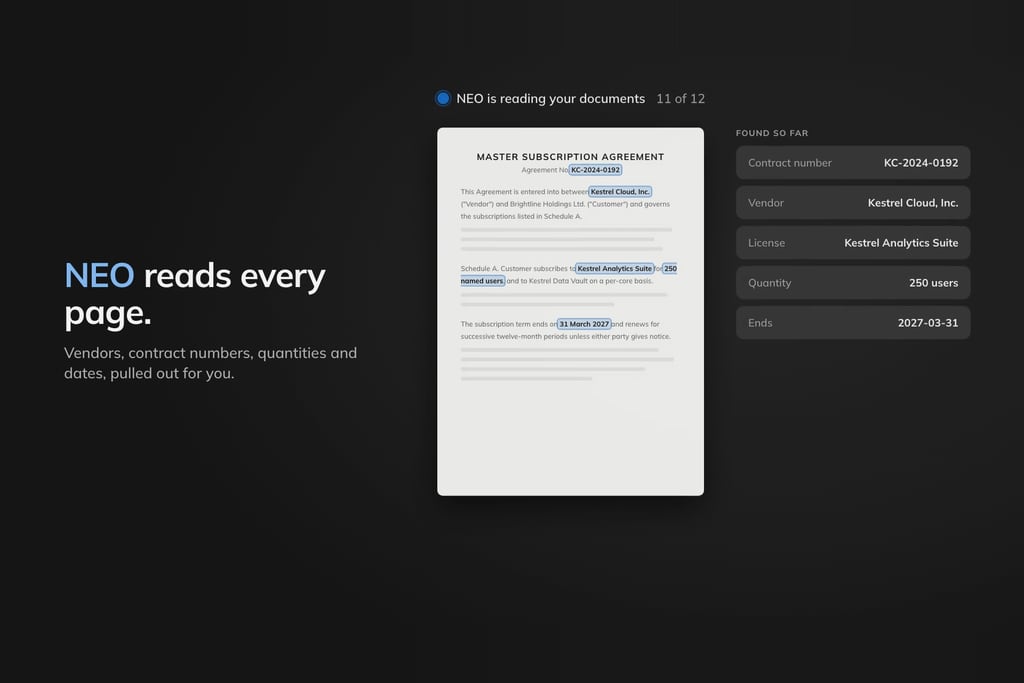
What NEO extraction does
Extraction and risk analysis now run in one simple workflow inside LCM. NEO reads each document the way an analyst would, including the ones that are only an image of text, and turns what it finds into structured contract and license data. That data is stored in LCM alongside the rest of your contract records rather than in a side spreadsheet, and anything that needs attention is flagged as part of the same pass.
- Any format. PDFs, screenshots, Word files and scans go in the same way. There is no need to convert, retype or clean a document up before NEO can read it.
- AI-powered OCR. Scanned pages and screenshots are read as text, so the contracts that only ever existed on paper are no longer the ones you skip.
- Centralized. The extracted data lands in LCM, in one place, instead of in whichever inbox or shared drive the document happened to arrive in.
- Risk flagged. NEO flags the risk while it extracts, so review starts from what needs a decision rather than from a blank page.
The workflow: drop it in, NEO does the reading
The release adds a Documents tab to LCM, and the workflow is deliberately short:
- Drop the documents in. Contracts, order forms, amendments, renewal quotes and other purchasing documents, in whatever format you have them.
- NEO extracts. It reads every page, including scans and screenshots, and pulls out the data that matters for your licenses and contracts.
- NEO centralizes. The results are stored in LCM with the rest of your contract records, so there is one place to look.
- NEO flags the risk. Anything that needs a closer look is highlighted, so your time goes on the exceptions, not on transcription.
The point is not that a machine can read a PDF. It is that the contract data you already own becomes usable the day the document arrives, not the quarter somebody finds time to key it in.
Why it matters for renewals and audits
Renewals and audits are where contract data earns its keep, and both run on deadlines. A renewal decision needs the entitlement, the term and the commercial conditions in front of the person making it, early enough to act on them. An audit response needs the same facts, provable from the signed documents, when the vendor asks for them, not after a week of searching folders.
When contracts sit in a drawer of PDFs, both conversations start with a scramble: who has the latest order form, which amendment superseded which, what exactly was bought. Extraction turns that scramble into a lookup. The documents are in LCM, the data has been pulled out of them, and the risks have already been flagged, so the time before a renewal date goes on negotiating and the time after an audit letter goes on answering.
How it fits LCM and the rest of NEO
LCM has long been the place LICENSEWARE customers keep their license agreements, order forms, amendments and price sheets, tied to the right contract record. NEO has been building on that library step by step. NEO Contract Analysis brought risk scoring and benchmarking to the contracts stored in LCM, and NEO Context lets you ask questions of those documents and get answers grounded strictly in what they say, with a link back to the source.
Extraction is the step in front of both. It is what turns a folder of documents in mixed formats into structured contract data in the first place, which is exactly what we set out to do when we first described bringing contract intelligence into LCM: extract, analyze and assess contracts without manual entry. The release notes sit on our releases page, and if you want to see what NEO produces from your own data, the NEO reports page shows the kind of analysis it delivers.
Getting started
NEO extraction is available in License and Contracts Manager now. Open LCM, go to the Documents tab and drop in the contracts you have been meaning to get to. If you are not a LICENSEWARE customer yet, or you would like a walkthrough on your own documents, book a call with our team.


