
From Lansweeper Inventory to a License Position



Lansweeper + LICENSEWARE: your inventory, your license position
If you run Lansweeper, you already know what is in your estate. Lansweeper finds managed and unmanaged assets across IT, OT and cloud. You can see which servers you have, which virtual machines run on them and what software is installed on each.
A software vendor asks a different question. It wants to know how many licenses that estate needs under its own rules. Oracle counts processors, Microsoft counts cores and client access licenses, and Red Hat counts socket-pairs. Answering that usually means exporting the inventory, rebuilding it in spreadsheets and reading the contract terms by hand. The data was never the problem. Turning it into a position took the time.
That is the job LICENSEWARE does with your Lansweeper data. You keep the platform you already run. LICENSEWARE reads the inventory it holds and works out the license position. No second agent goes onto your devices.
Devices, installed software, hardware and virtualization



What the integration does
LICENSEWARE connects to Lansweeper Cloud through the Lansweeper API. You choose which Lansweeper sites to share. LICENSEWARE then reads the devices and the software installed on them, and syncs on a schedule. Lansweeper's documentation lists three data types you can turn on: hardware and virtualization data, installed Microsoft software, and Java installations with device user information.
If you run Lansweeper On-Prem, you export custom reports from Lansweeper and upload them to LICENSEWARE. Lansweeper lists the integration for Lansweeper Cloud and On-Prem version 10.0.1 or higher, on the Pro and Enterprise plans.
Seven LICENSEWARE apps read your Lansweeper data, each for its own question:
- License and Contracts Manager (LCM): your agreements, entitlements and renewal dates, set against the installs Lansweeper reports.
- Software Inventory Manager (SIM): your inventory recognized, normalized and categorized, with end-of-life software flagged.
- Infrastructure Mapper (IFMP): servers, virtual machines and hosts placed in the infrastructure around them.
- Adobe Deployment Manager (ADM): the Adobe software installed on every device.
- Microsoft Deployment Manager (MDM): Windows Server, SQL Server and the rest of the Microsoft software on each device, for an effective Microsoft position.
- Oracle Java Deployment Manager (OJDM): the Java installations on every device.
- Red Hat Deployment Manager (RDM): Red Hat Enterprise Linux installs on your servers.
NEO, the LICENSEWARE AI SAM analyst, answers licensing questions across all of it, from your own data.
On lansweeper.comLICENSEWARE in the Lansweeper Integrations directoryThe LICENSEWARE listing in the SAM category, with its requirements and the bundle, on Lansweeper's own site.
Setup, step by step
These steps summarize the LICENSEWARE help center guide and Lansweeper's own documentation. The full screens are in both.
In Lansweeper Cloud
- Sign in as an administrator. Your role needs permission to let API clients access the site.
- Open Developer Tools, go to API clients and create an API client.
- Choose Personal Access Token as the authentication method.
- Give the client a name and set Integration to LICENSEWARE.
- Choose when the token expires.
- Grant access to the sites you want to sync, then create the client.
- Copy the token. Lansweeper shows it only once.
In LICENSEWARE
- Open Datasources, search for Lansweeper and select Lansweeper Cloud.
- Select Connect, paste the token, verify the connection and save the credentials.
- Turn on the data syncs for the apps you need.
The first import can take up to 24 hours to process. After that, LICENSEWARE syncs twice a week. The connection belongs to the LICENSEWARE project you set it up in, and that project sits in the region you signed up in. LICENSEWARE is SaaS only, in three separate production regions: European Union (West), United States (East) and Australia (APAC). It is SOC 2 Type 2 audited.
Three questions you can now answer
Question 1
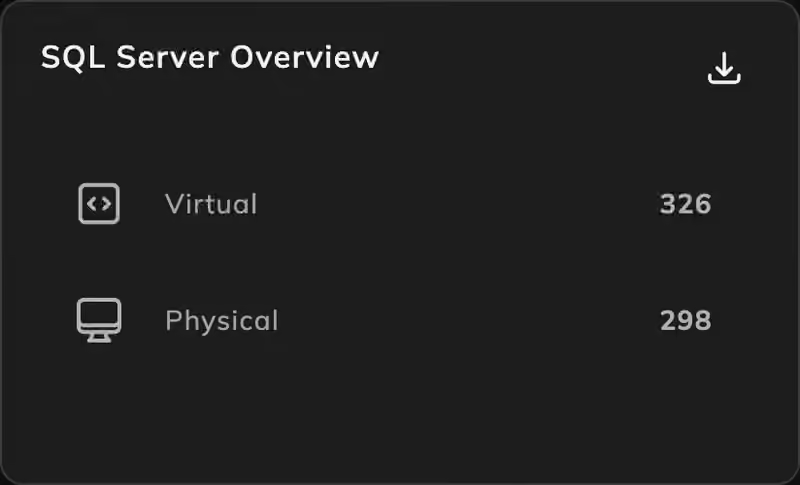
How many SQL Server core licenses do your VMware hosts need?
Microsoft Deployment Manager reads the SQL Server installs Lansweeper reports. Infrastructure Mapper places each virtual machine on its host. Together they give a core count you can defend.
Question 2
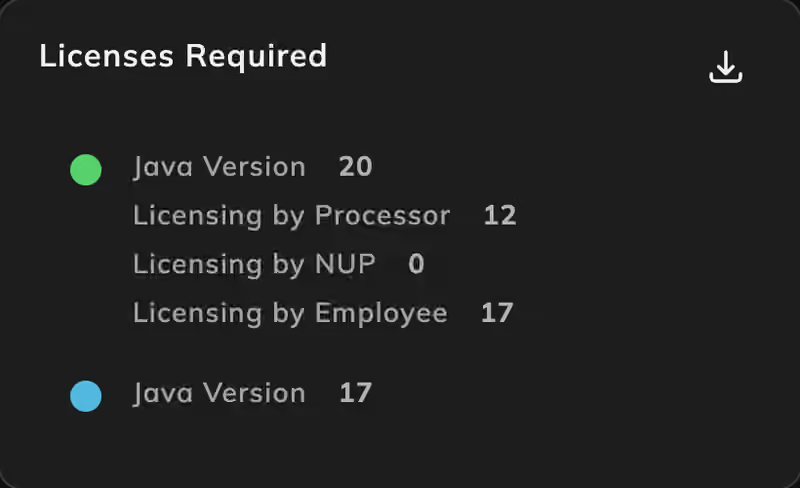
Which of your devices run Oracle Java, and on which versions?
Oracle Java Deployment Manager reads the Java installations Lansweeper already found. You see the exposure before the next conversation with Oracle.
Question 3
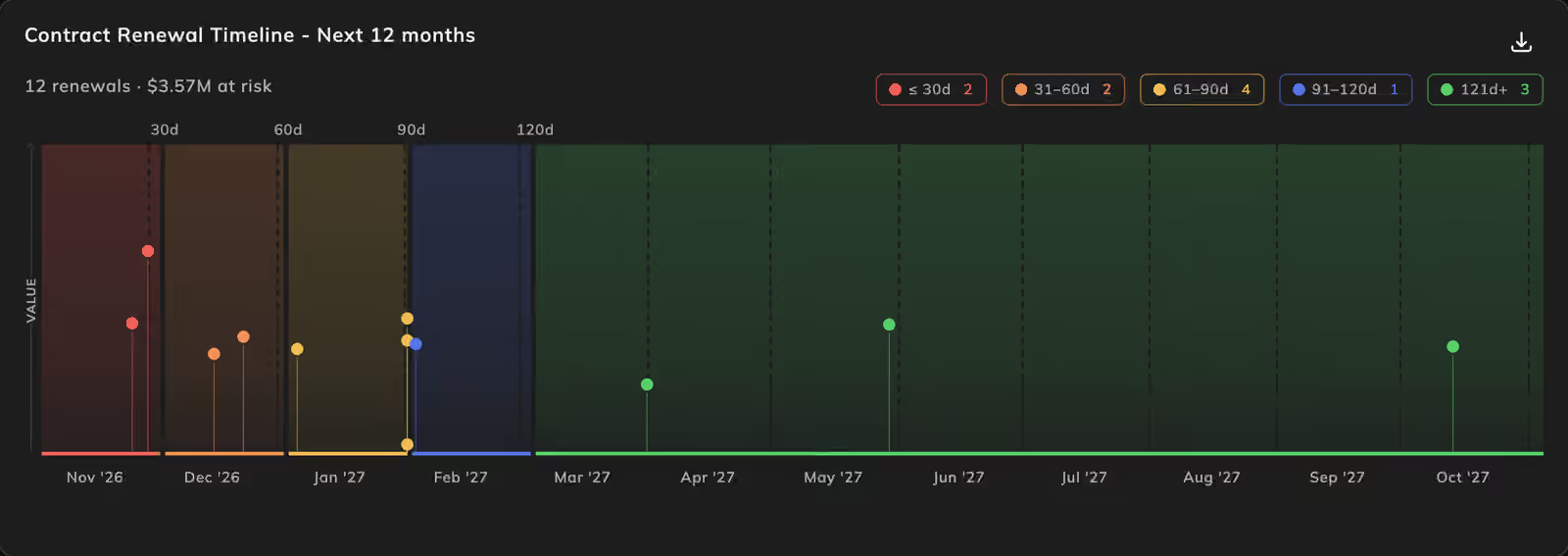
Where do your installs exceed your entitlements before the next renewal?
License and Contracts Manager sets your agreements and renewal dates against the installs in your Lansweeper inventory. You go into the renewal knowing what you use and what you can drop.
Every result traces back to the source record in Lansweeper, so you can produce the evidence when you need it.
Better together
Lansweeper gives you an inventory you trust. LICENSEWARE turns it into a license position you can act on. Neither one replaces the other, and you do not collect anything twice.
Lansweeper integrationHow the integration works, step by stepWhich apps read your Lansweeper data, Cloud and On-Prem, and the questions people ask before they connect.
Get started
- Already on Lansweeper? Find LICENSEWARE in the Lansweeper Integrations directory, or read the integration on licenseware.io.
- Want to try it first? Start on the LICENSEWARE Free plan. Every app runs on your own data, with reports capped at 10 rows per table.
- Run Proactivanet as well, or instead? The same apps read its inventory: from Proactivanet inventory to a license position, in Spanish.
- Comparing options? See every data source LICENSEWARE reads and our comparison of software license management tools.
