
What's new in LICENSEWARE
New integrations, smarter reports, faster insights. Here's everything we've shipped recently, written in plain English. No jargon, just what changed and what it means for you.
Collector, Now Generally Available. With Agent Management Built In.
Two years of hardening, thousands of installs. Collector is out of beta with a new control plane, activity timeline, and version-gated commands so updates never break older agents.
See Every Renewal on One Timeline.
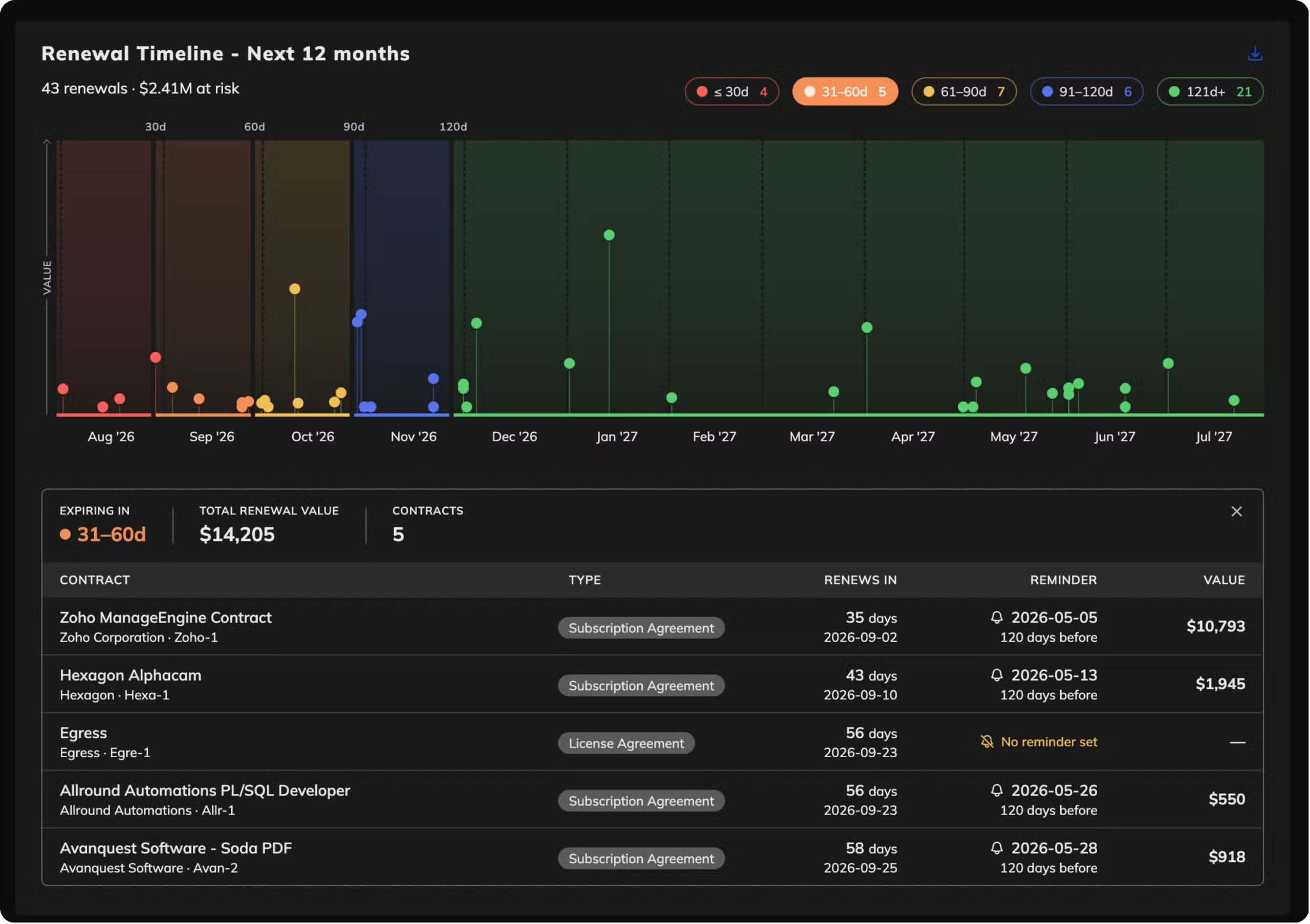
License Compliance Manager now includes a renewal timeline report component. Every upcoming license expiry laid out on a single visual timeline, so you can spot the clusters where multiple renewals hit the same quarter before they become a fire drill.
Collector, Now Generally Available. With Agent Management Built In.
Two years of hardening, thousands of installs, and enough field time to trust it with your production estate. LICENSEWARE Collector is officially out of beta. Alongside the GA milestone, we're shipping a new agent control plane so you can manage every deployed agent from one screen: see what's running where, when it last checked in, and roll out updates with proper version gating so nothing hits an agent that can't handle it.
-
Out of betaProduction-grade and fully supported. Existing beta installs are automatically GA.
-
Agent control planeManage every deployed agent from one screen. Send commands, roll out updates, retire installs.
-
Activity timelineGrouped view of what agents have been doing, so patterns and issues surface fast.
-
Version-gated commandsUpdates only run on agents that support them. No more accidentally breaking an older install.
- Feature Agent control plane for managing installs at scale from a single screen.
- Feature Grouped activity timeline that makes agent behaviour easy to read at a glance.
- Improvement Version-aware command dispatch so updates never hit incompatible agents.
- Note Existing beta customers are automatically GA. No action needed.
Cleaner Integrations, Reports, and Uploads.
The screens where you connect data sources, browse reports, and upload files got a full visual refresh. Consistent layouts, cleaner cards, better spacing. Same content, easier to scan. Account settings also got wired to a proper form now, so profile changes save cleanly on the first try.
Microsoft Graph, Now on Cleaner OAuth.
The Microsoft Graph connector migrated to client credentials OAuth. Cleaner authentication, easier to manage across tenants, and better aligned with Microsoft's current recommendations. If you're already connected, reconnect once from the Integrations tab to switch over.
GREG App Retired.
The GREG app has been retired from the platform. Customers who were actively using GREG have been contacted directly with a migration path. If you weren't reached and think you should have been, drop us a note through support.
NinjaOne Inventory, Streaming Straight Into LICENSEWARE.
If NinjaOne is how you run your endpoints, you already have the data LICENSEWARE needs. The new NinjaOne connector pulls device inventory, installed software, and asset status from your NinjaOne tenant straight into LICENSEWARE. No CSVs, no manual exports, no waiting on someone else to refresh the dump. Connect once, and your license analysis runs on data that's always current.
-
Device inventoryEvery managed endpoint, its OS, owner, and status pulled from NinjaOne in real time.
-
Installed softwareWhat's running on every machine, what version, where. Across your entire fleet.
-
Read-only accessThe connector only reads from NinjaOne. Nothing is changed or written back. Ever.
-
Always up to dateData refreshes in the background. Your license position reflects what's actually deployed, not last month's snapshot.
- Feature License demand from reality. Every install NinjaOne sees becomes part of your license analysis automatically.
- Feature Decommissioned devices stop counting. When a machine goes offline in NinjaOne, it stops inflating your license demand here too.
- Improvement Works with SIM out of the box. Software Inventory Manager picks up the data immediately, no extra mapping required.
- Note Joins the connector lineup. NinjaOne sits alongside Lansweeper, Microsoft Graph, ManageEngine, and Proactivanet as a first-class data source.
Smarter LCM: Renewal Reminders and Broader Allocations.
Two upgrades to License Compliance Manager landed in the same window. Automated renewal reminders now fire before each license expires, with configurable lead time per license so the right people get pinged at the right moment. And allocations now cover user-recognised products, not just catalog-mapped ones — so custom apps and internally-defined products get the same rigour as the big vendors.
Filtered Exports for Every Report Component.
You can now apply filters directly at export time and only pull the rows you actually want. Filter by vendor, date range, project, whatever the report supports — the exported file matches your filtered view exactly. No more slicing spreadsheets after the fact.
Sharper SIM: Bulk Edits, SCCM Uploads, EOL Dates.
A round of Software Inventory Manager improvements. You can now upload SCCM query results directly, with a dedicated uploader that handles the format natively. The bulk-edit template got simpler too: relevance is auto-derived where possible, EOL dates are baked in, and enum overrides now handle case variations cleanly with clear warnings when values get dropped.
Sharper Usage Data, Cleaner Device Charts.
Two improvements landed together. Collector now derives software last-used dates from running processes, so "is this app actually being used" is finally a precise question with a precise answer. And IFMP got a redesigned devices by OS and type visualization, rebuilt as a stacked bar chart that's much easier to read than the previous breakdown.
Proactivanet, Now a First-Class Data Source.
For teams running Proactivanet for IT asset management, getting that inventory into a SAM tool used to mean exports, transformations, and a lot of tab-switching. Not anymore. The Proactivanet connector pulls your CMDB inventory directly into LICENSEWARE, ready for license analysis the moment it arrives. Built and tested with European customers running mixed estates, certified ready for production use.
-
Your CMDB, ingestedEvery asset, configuration item, and software relationship from Proactivanet flows in automatically.
-
Always currentNo batched exports. The connector pulls fresh data so your license position reflects today, not last quarter.
-
Read-only accessNothing writes back to Proactivanet. We only read what we need for licensing.
-
Plays nice with everythingCombines with Lansweeper, Microsoft Graph, ManageEngine, and NinjaOne data without overlap.
- Feature One source of truth for ITAM stacks already running on Proactivanet. No duplicate inventory, no reconciliation work.
- Feature Combined view across data sources. Proactivanet sits alongside your existing connectors, so the analysis sees everything.
- Improvement First-class in the Integrations tab with proper iconography and a guided connection flow.
- Note Setup takes about five minutes. Hit Connect, paste your Proactivanet credentials, you're done.
Sign Up Faster, Skip the Form Wall.
Registration is shorter. We moved profile completion to first login, so the front door is now just email and password. We also added a proper onboarding flow that walks new users through the first useful screen. And if you're already logged in, hitting the login or signup URLs now bounces you straight to the app instead of making you stare at another form.
Refreshed Catalogs Across MDM, MEM, and ODB.
The product and edition catalogs underpinning Microsoft device licensing (MDM), Microsoft enterprise licensing (MEM), and Oracle Database licensing (ODB) got their scheduled refresh. New SKUs, retired editions, and updated metric definitions are now reflected in your analyses. ODB also now excludes unused database options from processor total cost, so you're not paying phantom licenses for features you never enabled.
Reserve Licenses Where You Need Them. See Renewals Like a CFO.
Two big upgrades to License Compliance Manager landed together. You can now create custom reservations to ringfence licenses for specific projects, business units, or future hires, with a dedicated allocations view that shows exactly where every entitlement is committed. The financials and renewals reports got a full redesign too, built around the questions you actually ask before a renewal: what's it costing, what's expiring, what should we cut.
-
Custom license reservationsSet aside entitlements for a project, team, or planned headcount. Track exactly what's reserved, what's deployed, what's free.
-
Allocations viewA single screen showing every license, its assignment, and its reservation status across all projects.
-
Redesigned financial reportsCost by vendor, cost by project, cost trend over time. Built for renewal conversations with finance.
-
Smarter renewals viewWhat's expiring, when, what it costs, and whether you're using what you're paying for. All in one screen.
- Feature Custom reservations let you allocate licenses to specific projects, departments, or future deployments without losing visibility.
- Feature Allocations screen on every license, showing reservation, assignment, and free pool side by side.
- Improvement Financial reports redesigned around vendor cost, project cost, and trend over time. Built for the conversations you actually have.
- Improvement Renewals view consolidates expiry dates, contract value, and actual usage so you walk into renewals with leverage.
Get Help Without Leaving the App.
The "contact support" link no longer kicks you out to your email client. Hit support from inside LICENSEWARE and we open a HubSpot ticket for you, with your account context attached automatically. Faster routing for us, less context-switching for you.
Your Contracts, Your Rules. Now Tailored Per Project.
Every SAM team handles contracts a little differently. Some track renewal dates and SLAs, others care about custom metrics, discount tiers, or vendor-specific fields. Now License Compliance Manager lets each project define its own contract and license structure, so you're not forced into a one-size-fits-all template.
-
Custom fields per projectAdd the fields that matter for each customer or engagement, not a generic set.
-
License structures that fitCapture Oracle's metrics differently from Microsoft's. Because they are different.
-
Cleaner navigationWe moved navbar features into the sidebar. Less clutter, more screen for your data.
-
Faster issue responseBehind the scenes we improved error tracking, so bugs get caught and fixed faster.
- Feature Custom contract templates for every project you run, with your own fields and metadata.
- Feature Per-project license structures that match the way each vendor actually licenses their software.
- Improvement Redesigned navigation with everything consolidated into the sidebar for a calmer interface.
- Note Retired the old CMM app. Its functionality is fully absorbed into LCM.
Custom Fields Now Show Up in Reports.
When we shipped custom fields per project earlier this month, they captured your data but didn't surface in reports. Now they do. Every field you define on a project flows through to compliance, license, and contract reports, properly flattened in tables so you can sort, filter, and export them alongside everything else.
Upload Bigger Files Without the Errors.
Big CSVs, hefty inventory exports, wide hardware dumps. We've all hit a size limit at the worst time. We raised the ceiling on uploads and reworked how the platform handles large datasets in the background. Result: you can now feed LICENSEWARE the whole file, not the trimmed-down version.
Patch-Aware Oracle Java Licensing.
Oracle's Java licensing terms hinge on which patch level you're running, and the rules change with every quarterly update. Oracle Java Deployment Manager now reads the patch level on every install, applies the correct licensing logic for that specific build, and tells you exactly where you owe and where you don't. Stop overcounting on patches Oracle hasn't asserted on, and stop missing the ones they have.
Collector: More Reliable in Corporate Networks.
A round of Collector reliability improvements. The Windows agent now preserves proxy environment variables across service restarts, so corporate-proxy setups stop dropping mid-scan. Ingestions are faster too, with fewer retries and less load on your network.
Themes That Follow Your OS, Auth Pages That Feel Like the Product.
LICENSEWARE now respects your operating system theme by default. If your OS is in dark mode, so is LICENSEWARE. Switch to light during the day, and the app follows. You can still pin a manual preference if you prefer. We also redesigned the login, signup, and password-reset pages so the entry into LICENSEWARE finally looks like the rest of LICENSEWARE.
A Wave of Platform Polish.
A quieter stretch of releases that add up. Cards and integration tiles have consistent hover states now. SSO users get proper settings access on first login. Custom branding caps images at 1MB so pages stay snappy. IFMP source-system IDs now resolve correctly in the data tab. And LCM template filling handles case variations properly.
Shorter-Lived, Auto-Expiring Share Links.
Public report links now rotate to a new, time-bound format. Any link generated before March 31 has been retired, so when you stop sharing a report, the old URL stops working. To keep an existing share alive, open the report, hit Share, and grab a fresh link. Takes about 10 seconds.
- Security New share-link format with stricter validation, replacing the previous URLs from March 31.
- Feature Stop-sharing actually stops sharing. When you revoke a link, it can't be reused later, even if someone bookmarked it.
- Improvement One-click regeneration from the share menu on any report.
- Note Only public share links were rotated. Workspace logins and private access work the same as before.
A New NEO Insight: App Rationalisation.
NEO can now look across your software estate and tell you where you're paying for two tools that do the same thing. Think: three screenshot tools, five file-transfer apps, overlapping BI platforms. The new App Rationalisation report surfaces these overlaps and gives you a clear consolidation path, with the savings attached.
Model Armor: Enterprise-Grade Guardrails Around NEO.
We added Model Armor, an enterprise-grade safety layer, to every AI-powered feature in LICENSEWARE. It screens prompts going into the model, validates outputs coming back, and enforces tenant isolation across NEO. Same insights you already get, now running on production-grade infrastructure that meets enterprise procurement requirements.
- Security Prompt injection screening on every input before it reaches the model.
- Security Output validation keeps responses on-task and inside your data scope.
- Feature Sub-millisecond overhead. Same NEO speed, with the safety pipeline running in parallel.
- Note Audit-ready by default. Useful when IT and security teams ask how AI requests are governed.
ManageEngine Endpoint Central, Now Plug and Play.
If you're using Endpoint Central to manage your devices, you've got exactly the data LICENSEWARE needs. It just wasn't easy to get out. No more. Connect once and your device and software inventory flows into LICENSEWARE automatically. No exports, no CSVs, no scripts, no waiting for someone to remember to refresh the data.
-
Your device inventoryEvery managed device, its OS, who owns it, whether the agent is healthy.
-
All installed softwareWhat's installed where, what version, how many copies. Across your whole fleet.
-
Read-only accessWe only read from Endpoint Central. Nothing is changed or written back. Ever.
-
Always up to dateData refreshes continuously in the background. Your license position reflects reality, not last month.
- Feature Accurate license demand based on what's actually installed, not what someone typed into a spreadsheet.
- Improvement Retired devices stop inflating your numbers. We cross-reference status so ghost endpoints don't skew the analysis.
- Feature Over-deployment and shelfware surface on their own, no manual review cycle needed.
- Note Works with the Software Inventory Manager out of the box, feeding it clean structured data.
NEO Insights Reports, Now Officially Live.
The full lineup of NEO Insight reports went live this month: Software Rationalization, IT Infrastructure Risk and Hygiene, Sustainability, Digital Sovereignty, Oracle Database Optimization, and RHEL Risk. Each one turns your LICENSEWARE data into a clear, human-readable PDF report that tells you what to fix, what to cut, and what to renegotiate. CORE customers get one per report type per month. ADVANCED gets one per week.
Microsoft 365 Licensing, Finally in Real Time.
If you've ever tried to figure out who's actually using their Microsoft 365 license, you know the drill: export a CSV, open PowerShell, pray for accuracy, repeat next quarter. The new Microsoft Graph connector ends that. Connect once, and LICENSEWARE pulls your M365, Entra ID, and Intune data automatically. Always current, always accurate.
-
Who has whatEvery user, every assigned license, every group-based assignment. No more guessing.
-
Who's actually using itActivity and usage data across M365 services. Spot dormant users and shelfware.
-
Which devices are joinedEntra ID and Intune device inventory, ready for license analysis in SIM.
-
Read-only permissionsRead scope only. The connector cannot create, modify, or delete anything in your Microsoft 365 tenant.
- Feature Spot unused licenses in minutes instead of weeks. Dormant users, unused subscriptions, assigned-but-never-logged-in accounts.
- Feature Catch group-assignment waste. When licenses flow through groups, duplicates and misalignments hide easily. Not anymore.
- Feature Find downgrade opportunities. If someone has E5 but only uses E3 features, we'll tell you.
- Note Foundation for more. This is the base layer. Expect deeper Microsoft-specific reports to build on top of it.
NEO Insights Reports, Now in Minutes Instead of a Day.
When we first launched NEO Insights, we optimized for depth. Every report was thorough, thoughtful, and genuinely useful, and it took us 24 hours to generate. Most people were fine with that. But we heard you: sometimes you need the answer before lunch. We cracked it. Same depth, same quality, now in the time it takes to grab a coffee.
- Report Software Rationalization and Cost Optimization. Finds redundant tools and functional overlap, with real dollar savings attached.
- Report IT Infrastructure Risk and Hygiene. End-of-life software, security threats, and shadow IT, with a clear path to fix each one.
- Report IT Infrastructure and Sustainability. Aging hardware, energy inefficiencies, and standardization recommendations.
- Report Digital Sovereignty and Strategic Migration. Opportunities to reduce vendor lock-in with European or open-source alternatives.
- Report Oracle Database Optimization. Your Oracle liability, edition downgrade options, OCI consolidation plays.
- Report RHEL Risk and Optimization. Your Red Hat Enterprise Linux environment, compliance gaps and savings.